
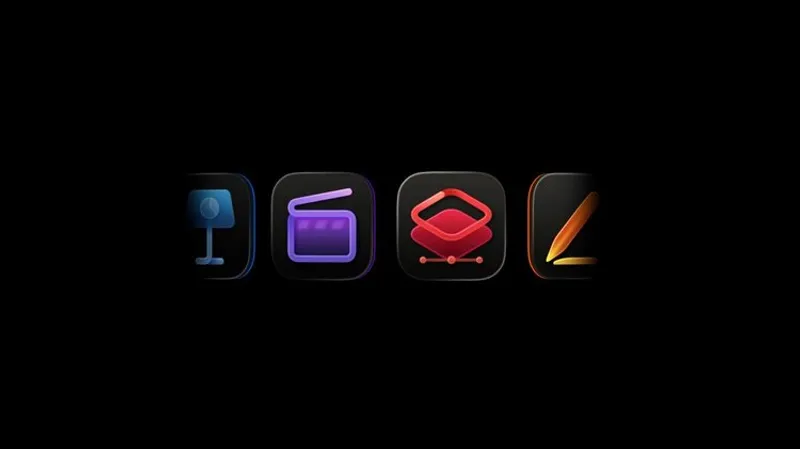
TLDR: CUPERTINO—Apple published a support document and Liquid Glass icons so Creator Studio app versions match up with standalone editions.
Key Takeaways:
- Apple Creator Studio bundles pro apps under one subscription alongside standalone one time purchases.
- Final Cut Pro, Logic Pro, MainStage, Motion, Compressor, and Pixelmator Pro now show Liquid Glass Creator Studio icons.
- A shared app name plus dual installs triggered real confusion, prompting Apple to add public, side by side Dock guidance.

If you have two Final Cut Pro icons that look identical at first glance, Apple now admits the problem exists. This is the small fix pro users need, before troubleshooting turns into detective work.
If you have two Final Cut Pro icons that look identical at first glance, Apple now admits the problem exists. This is the small fix pro users need, before troubleshooting turns into detective work.
Q&A
Why did Apple need icon redesigns instead of changing names for each edition?
The support doc suggests Apple chose visual differentiation, keeping app names consistent while reducing confusion through icon cues users see first.
What happens when users troubleshoot the wrong edition, and how costly can that confusion be?
Support steps can diverge by feature availability, so running the standalone version could make subscriber only fixes look like they are not working.
Could Apple expand this approach to other dual release app pairs beyond pro creative tools?
Publishing a dedicated reference page for two of its own editions signals Apple may repeat icon based differentiation if similar bundle versus standalone overlap grows.
How does Pixelmator Pro’s inclusion hint at Apple’s longer term pro workflow strategy?
Adding Pixelmator Pro to Creator Studio while using icon branding implies Apple wants a unified subscription based creative pipeline rather than scattered purchases.
If a user upgrades macOS and icons change, what is the most reliable way to confirm which version they have?
Apple’s guide points users to Dock and Applications folder icon comparisons, so checking there beats relying on memory or shortcut labels.




No comments yet. Be the first to share your thoughts!