
Apple’s glowing Siri orb exposes AI UI shortcomings
 Apple
Apple Siri
Siri Microsoft
 Google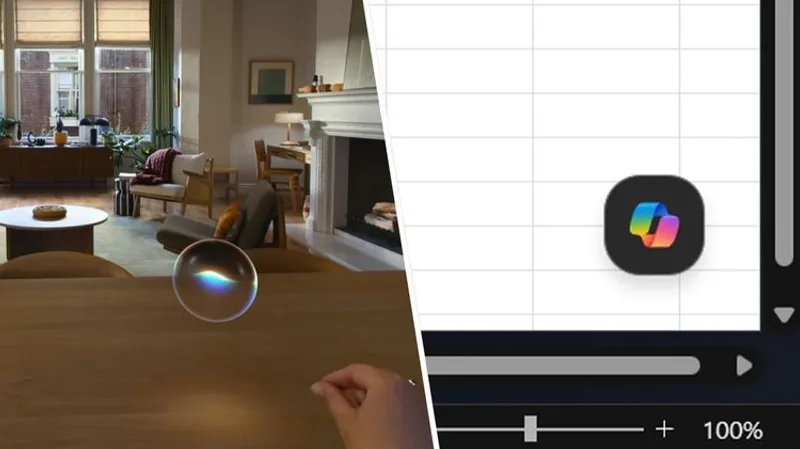
TLDR: LONDON—Apple shows a movable Siri orb with environmental lighting on visionOS, spotlighting AI UX as Google and Microsoft pile on UI clutter.
Key Takeaways:
- Background: As AI features land everywhere, UI design becomes the battleground for everyday apps like Excel and for Apple Vision Pro experiences on visionOS.
- Main fact: Siri AI on visionOS appears as a movable glowing ball that lights surrounding surfaces in AR, unlike flat, shadowless windows.
- Meaning: Apple’s interface treats visuals as interaction cues, while Copilot overlays spreadsheets and Gemini prompts can keep resurfacing despite dismissals.
- Why it matters: Better interface physics and placement can make virtual tools feel usable, not just installed.

AI is racing outward, but the interface is where users feel it. Apple is selling comfort through lighting and control, while competitors keep choosing buttons that get in the way.
AI is racing outward, but the interface is where users feel it. Apple is selling comfort through lighting and control, while competitors keep choosing buttons that get in the way.
Q&A
If Siri on visionOS already looks interactive, what would make it meaningfully better than a pretty effect?
More responsive gestures, context aware placement, and consistent light and shadow behavior across scenes would turn a visual cue into a reliable interaction system.
Why do AR lighting details matter more than they seem for voice assistants?
In mixed reality, tiny depth and illumination cues guide attention. If the assistant looks disconnected from the room, users stop trusting what it is pointing to.
What is the likely next move for Google and Microsoft given pressure on UI clarity?
Expect more controls to minimize overlays and fewer always on prompts, because user tolerance drops fast when AI elements obscure core tasks.
Could Apple’s approach pressure developers beyond Apple platforms?
Yes. Once users experience an AI interface that behaves like part of the environment, they will demand similar integration from third party apps.
Why might Copilot overlap problems feel worse in spreadsheets than in chat style tools?
Spreadsheets depend on precision. Any floating UI that covers cells breaks flow immediately, so the interface becomes a productivity tax.





No comments yet. Be the first to share your thoughts!