
macOS Golden Gate surfaces Rosetta 2 breakage for Intel apps
 Intel
Intel Apple
Apple macOS
macOS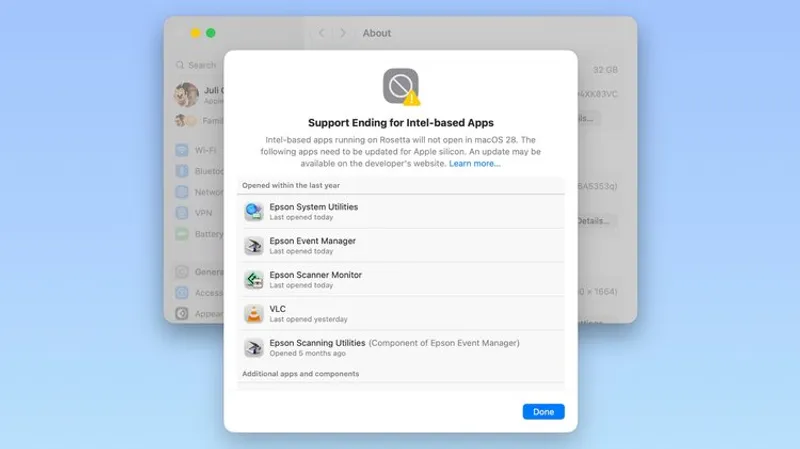
TLDR: macOS Golden Gate flags Rosetta 2 dependent apps every restart or Intel app launch. It also lists future breakage in Settings, with a one time Rosetta install and broken pre login plugins.
Key Takeaways:
- Apple silicon Macs only, with Rosetta 2 support fading after warnings starting in macOS Tahoe
- Golden Gate shows warnings and an Intel based apps Details list under Settings General About
- Pre login Rosetta plugins may fail, pushing users to contact developers or switch apps before support ends

Apple is turning compatibility into a checklist, not a surprise. The most fragile breakpoints are the ones you never see, like pre login utilities that quietly stop loading.
Apple is turning compatibility into a checklist, not a surprise. The most fragile breakpoints are the ones you never see, like pre login utilities that quietly stop loading.
Q&A
What happens if you rely on an Intel based authentication plugin for logins?
You may lose plugin loading in macOS Golden Gate, so your next login flow could fail until the vendor ships a native Apple silicon update.
Why do you still see Rosetta warnings even if you never opened an Intel app recently?
Golden Gate can detect Rosetta dependent apps on launch or restart, then prompts you again so the problem surfaces early instead of later.
What is the practical difference between “warnings” and the “Details” list?
Warnings trigger attention at restarts and Intel app openings, while the Details list lets you inventory breakage in one pass and plan upgrades or replacements.
How should businesses use this list differently than individual users?
Teams can map each named app to an owner, device, and workflow, then schedule vendor outreach and contingency plans before the future cutoff.
If Rosetta 2 is no longer installed automatically, what user experience tradeoff is Apple making?
Apple forces a just in time setup when you first launch a blocked app, but it also makes failures happen sooner for components like pre login tools.




No comments yet. Be the first to share your thoughts!